TUS-Navigator is a neuronavigation system designed for Transcranial Ultrasound.
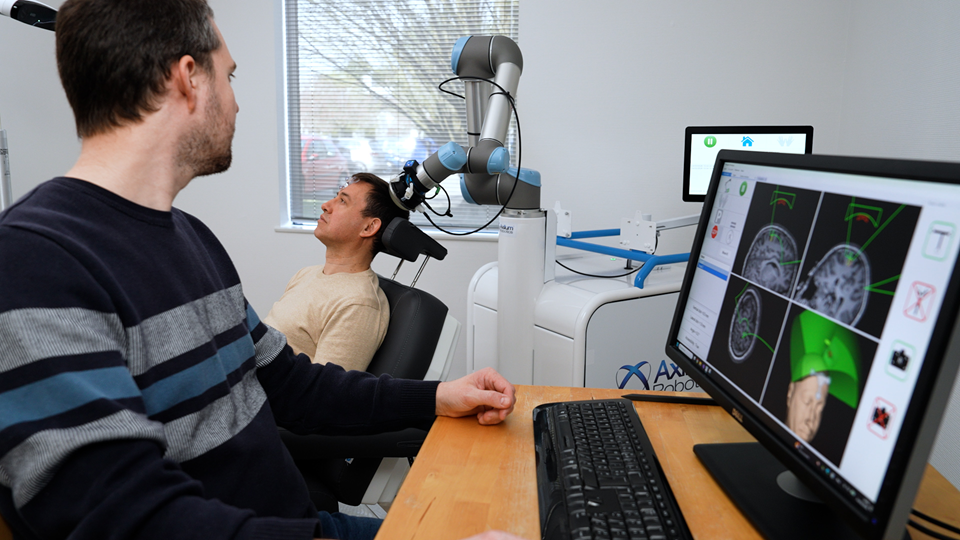
Overview of TUS-Navigator piloting a TUS-Cobot
TUS-Navigator is a device for investigational use only.
The system uses a NDI Polaris Vega ST camera with extended pyramid, probe and markers with Radix lenses.
Main features:
- Images loading:
DICOM format
NIFTI format
MNI template usage
- Visualization:
Visualization of the three 2D slices (axial, coronal, sagittal)
3D visualization of segmentations, targets, trackers, and tools
- 2D Visualization:
Navigation within slices
Contrast adjustment (window/level)
Zoom adjustment (in/out)
Distance measurement between two points
- 3D Visualization:
Translation and rotation of the 3D scene
Display of frames for all objects
Display of the current target and cursor positions in multiple coordinate systems (image/volume center/MNI/Talairach)
- Segmentation:
Skin segmentation
Brain segmentation (using an external tool)
- Targeting:
Target definition on 2D images
Target definition by coordinates (within the image)
Automatic projection of the entry point on the skin after target definition
Possible positioning of the entry point on 2D images
Possible change of the entry point orientation
Possible change of the entry point offset (depending on the entry/target axis)
Change of the visualization so that the 2D slices follow the entry/target axis
- Patient/MRI registration:
Definition of anatomical landmarks for initial registration (minimum 3 points)
Surface registration
- Talairach registration:
Possibility of registering the MRI on the Talairach template
- MRI/CT registration:
Possibility of registering the patient’s CT scan (DICOM or NIFTI format) on their MRI scan
- Transducer integration:
Possibility of displaying the theoretical focal point position
Possibility of changing the theoretical focal point position by modifying the electronic transducer steering
- Cobot piloting:
Interconnection with Axilum Robotics Cobot platform
Arm power-up/calibration
Manual movement
Transducer pressure sensor verification
Pressure sensor sensitivity adjustment
Target alignment and tracking
Offset adjustment during tracking (to move the transducer closer/further away)
- Overlays:
Ability to display layers calculated by the software (skin/brain/CT)
Potential integration of acoustic simulation tool
- API:
Ability to interact with the software via text commands (implementation examples in Python and MATLAB)